
How Much Does POS System Installation Cost?
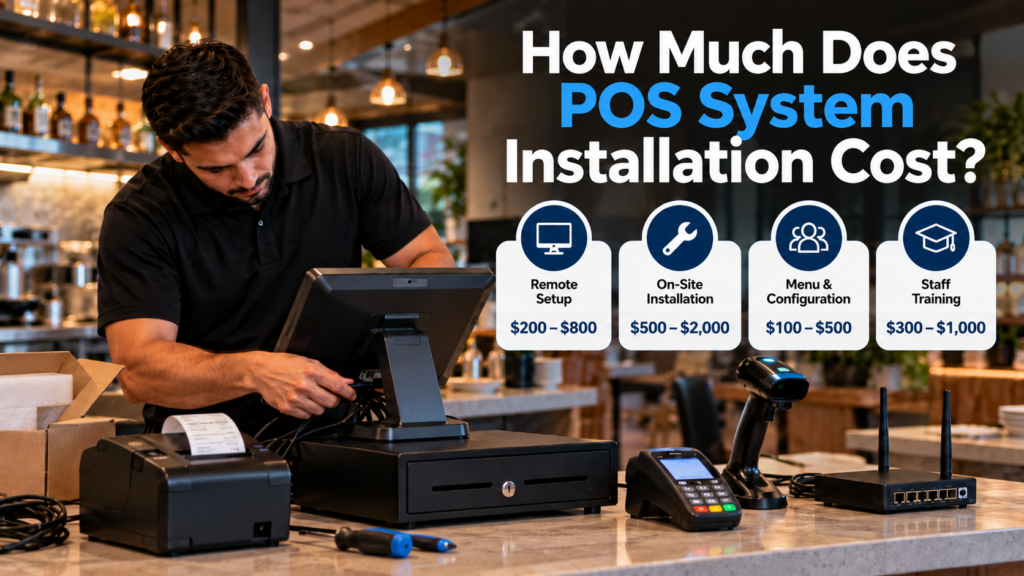
POS system installation typically costs anywhere from $0 for a basic self-service setup to $2,000 or more for professional on-site installation. The final price depends on the number of terminals, hardware requirements, software configuration, network connections, staff training, and whether the business is opening a new location or replacing an existing system.
For a small retail shop, installation may involve connecting a touchscreen terminal, receipt printer, cash drawer, and payment device. A restaurant with several registers, kitchen printers, handheld devices, and online ordering integrations will usually require more planning and setup time.
The important distinction is that POS installation cost and total point of sale setup cost are not the same thing.
Installation covers the work needed to get a system running. The full setup budget may also include purchasing equipment, software subscriptions, payment processing, training, and ongoing support.
West Coast POS helps Southern California businesses review these requirements before choosing a system, so owners can understand what equipment and installation services their operations actually need.
How Much Does POS Installation Cost in 2026?
Professional POS installation pricing varies by provider, but published 2026 estimates give business owners a useful starting point.
| Installation service | Estimated cost |
|---|---|
| Basic self-service installation | $0 in professional labor |
| Remote professional setup | $200–$800 |
| On-site POS installation | $500–$2,000 |
| Restaurant menu configuration | $100–$500 |
| On-site staff training | $300–$1,000 |
| Complex multi-terminal installation | Custom quote, potentially several thousand dollars |
These are general market planning estimates, not West Coast POS prices. Actual charges may overlap or be included in a bundled installation package.
The ranges for remote installation, on-site service, menu configuration, and staff training are drawn from Owner.com’s 2026 restaurant POS cost guide. For larger deployments, SRS Networks’ 2026 installation guide reports approximately $350–$850 per terminal for installation labor and related work, excluding hardware.
A business should request an itemized quote before assuming a particular price applies to its location.
What Is Included in POS System Installation?
Professional POS installation involves more than plugging a touchscreen into an outlet.
The exact scope depends on the equipment, software, business type, and service agreement.
Hardware installation
Most point of sale setups begin with connecting and positioning the equipment staff will use throughout the day.
Common hardware includes:
Touchscreen POS terminals or tablets
Credit card payment terminals
Receipt printers
Cash drawers
Barcode scanners
Customer-facing displays
Label printers
Kitchen printers or kitchen display systems
Handheld ordering devices
Equipment placement matters. A restaurant server should be able to enter orders without interrupting the service area, while a retail cashier needs easy access to scanning equipment, the receipt printer, and cash drawer.
A poorly planned counter setup can create unnecessary work for employees even when the software itself functions correctly.
POS software configuration
Installing the hardware is only part of the process.
The POS software must also be configured for the business.
This may include creating product categories, entering prices, setting up taxes, adding employee accounts, assigning permissions, configuring receipts, and preparing reports.
For restaurants, configuration can also involve menu modifiers, dining areas, kitchen routing, discounts, and tipping settings.
For retail stores, setup may focus on product catalogs, barcode scanning, inventory tracking, and checkout procedures.
The more information that needs to be programmed, the more time the setup may require.
Payment terminal configuration
Payment devices need to work with the business’s supported payment processing arrangement.
This includes verifying connectivity, confirming accepted payment methods, testing transactions, and making sure payment totals match the POS workflow.
Business owners should clarify whether payment terminal activation and testing are included in their installation quote.
Network and device connections
POS terminals, printers, handheld devices, and other equipment may depend on a stable network connection.
Installation may involve reviewing WiFi coverage, connecting Ethernet cables, configuring printers, and testing communication between devices.
Businesses with multiple checkout stations or kitchen display systems often need additional network planning.
New wiring, specialized network equipment, or electrical work may be charged separately.
Staff training and launch testing
A POS system is not fully ready simply because the screen turns on.
Employees should be able to complete transactions, find products, apply authorized discounts, print receipts, and respond to common checkout issues.
Managers may also need training on reports, refunds, employee permissions, inventory adjustments, and daily closeout procedures.
Before the business goes live, the installer should test the workflows employees will use during a normal shift.
What Affects the Total Point of Sale Setup Cost?
Two businesses may purchase similar POS software but receive very different installation quotes.
The difference usually comes down to the complexity of the setup.
1. Number of POS terminals
A business installing one register generally requires less hardware, configuration, and testing than a location installing five.
Every additional station may need a separate terminal, printer, payment device, network connection, and software configuration.
Some providers charge per terminal, while others quote the project as a complete installation.
2. Type of business
A small boutique may only need a basic checkout counter.
A full-service restaurant might need:
Several POS terminals
Kitchen display systems
Kitchen receipt printers
Handheld ordering devices
Menu modifiers and dining sections
Tip settings
Online ordering integrations
Employee permissions and reporting
These extra devices and workflows can increase installation time.
Businesses should compare quotes based on the actual work being performed rather than the number of registers alone.
3. Existing equipment and compatibility
If the business already owns compatible hardware, some equipment may be reusable.
However, not every POS platform supports every printer, scanner, cash drawer, or payment terminal.
Before assuming existing hardware can be kept, ask whether it is supported and whether the installer will configure and troubleshoot it.
Buying inexpensive equipment without confirming compatibility can create additional costs later.
4. Network readiness
A store with reliable internet, accessible power outlets, and properly located network connections may need very little infrastructure work.
A larger restaurant or older building could require new cabling, stronger WiFi coverage, or network upgrades.
These costs are not always included in a standard POS installation fee.
5. Data and menu migration
Businesses replacing an older POS system may need to transfer information into the new platform.
This can include product names, prices, inventory records, customer information, or restaurant menus.
Not all information transfers automatically, and available migration options depend on the old and new systems.
A provider should explain what can be imported, what requires manual work, and what information may not transfer.
6. On-site support and training
Some systems include remote onboarding.
Others offer professional installation and in-person employee training.
On-site work may increase the initial cost, but it can be valuable for businesses with complicated equipment or employees who need hands-on instruction.
Travel, after-hours service, and additional training sessions may affect the final quote.
POS Hardware Cost vs Installation Cost
Hardware and installation should be listed separately when comparing offers.
For example, Square publicly lists the following equipment prices:
| Example hardware | Listed equipment price |
|---|---|
| Square Stand | $149 |
| Square Terminal | $299 |
| Square Handheld | $399 |
| Square Register, second generation | $899 |
Source: Square POS hardware pricing, accessed October 2026. Prices are examples from one provider and may change. Accessories, compatible tablets, taxes, software, and installation can cost extra.
These prices illustrate why hardware and installation are different expenses.
Buying an $899 register does not necessarily mean the complete business setup costs $899.
The owner may still need software, compatible accessories, configuration, payment services, staff training, and additional equipment.
The same distinction applies to other POS brands and hardware packages.
Sample Point of Sale Setup Cost for a Small Business
Consider a small retail store opening with one checkout station.
The owner needs a POS terminal, payment device, barcode scanner, receipt printer, cash drawer, and basic staff training.
An illustrative budget might look like this:
| Expense | Example budget |
|---|---|
| POS terminal and accessories | $800 |
| Barcode scanner | $150 |
| Receipt printer | $250 |
| Cash drawer | $150 |
| Professional installation and configuration | $500 |
| Initial training | $200 |
| Example upfront total | $2,050 |
This is a hypothetical budgeting example, not a vendor quote or a verified market average. Taxes, software subscriptions, payment processing fees, and additional infrastructure are excluded.
The actual price could be lower if the owner uses a bundled package or installs the equipment independently.
It could also be higher if the store needs multiple registers, inventory migration, additional devices, or more extensive training.
The useful takeaway is to budget for the complete setup rather than purchasing equipment without accounting for installation.
Does POS Installation Cost More for Restaurants?
Restaurant POS installations are often more involved than a basic retail checkout setup because orders may need to move between servers, kitchen staff, bartenders, and payment devices.
A restaurant may need several connected workflows:
Front counter or dining room: Staff enter orders, apply modifiers, split checks, and complete payments.
Kitchen: Orders route to the correct kitchen printer or display screen.
Handheld devices: Servers enter orders or process supported payments away from the main register.
Management: Owners review sales, employee activity, discounts, refunds, and end-of-day reports.
If one of these connections is configured incorrectly, the problem may not appear until the restaurant becomes busy.
That is why installation testing matters just as much as mounting the equipment.
A smaller quick-service restaurant may require a straightforward setup, while a full-service restaurant with several preparation stations and integrations may need a larger installation project.
Is Professional POS Installation Worth the Cost?
Not every business needs an installer.
A single tablet-based register with minimal accessories may be manageable for an owner who is comfortable configuring equipment.
Professional installation becomes more valuable when a business depends on multiple connected systems or cannot afford significant interruptions during service.
When DIY installation may make sense
Self-installation can be reasonable for businesses with one register, limited hardware, simple product catalogs, and access to clear vendor instructions.
The owner still needs to budget time for configuration, testing, troubleshooting, and learning the software.
A system that is free to install is not necessarily free in terms of time.
When professional installation may be the better option
Consider professional setup when the business has multiple registers, kitchen devices, a large menu, inventory requirements, existing equipment to integrate, or employees who need hands-on training.
It may also be worthwhile when switching systems and trying to minimize disruption.
The purpose of hiring an installer is not simply convenience. It is to help ensure that the equipment and daily workflows are properly configured before customers begin using them.
Are There Hidden POS Setup Fees?
Unexpected expenses often come from services that the business assumed were included.
Before accepting an installation proposal, ask whether the price includes:
Hardware delivery and physical installation
Software activation and configuration
Menu or product catalog programming
Payment terminal setup
Network configuration
Data migration
Employee and manager training
Testing before launch
Additional on-site visits
Technical support after installation
Also ask about software subscriptions, equipment replacement, optional features, payment processing charges, and cancellation terms.
For example, a quote might include the physical installation but exclude product data entry or staff training.
Another provider might bundle all three.
The lower advertised installation fee is not necessarily the lower total cost.
How Long Does It Take to Install a POS System?
Installation time depends on the equipment and preparation required.
A basic single-register setup may be completed in a few hours once hardware, accounts, and product information are ready.
A restaurant with multiple registers, kitchen systems, menu programming, staff training, and integrations may require a longer rollout.
Data migration and coordination with payment service providers can also affect the schedule.
For businesses switching from an existing POS, the safest approach is to plan installation and testing before discontinuing the old system.
A practical launch process includes preparing the hardware, configuring the software, testing transactions, training staff, and confirming that support will be available during the transition
How to Reduce POS Installation Costs Without Cutting Corners
There are ways to control point of sale setup costs without sacrificing important features.
Prepare product and menu information in advance. Organized spreadsheets with accurate descriptions, categories, prices, and taxes can reduce configuration work.
Confirm hardware compatibility before purchasing. Avoid paying twice for equipment that cannot connect to the chosen platform.
Know how many registers you actually need. Additional terminals should match customer volume and daily operations.
Ask what onboarding includes. Some providers include configuration or training in their packages.
Schedule installation before opening or switching. Last-minute changes and emergency visits can increase labor costs.
Train managers first. Managers who understand the system can help support new employees and reduce repeated training needs.
The goal should be a reliable setup that fits the business, not simply the lowest possible installation charge.
POS Installation and Training in Southern California
Business owners in Ontario, Rancho Cucamonga, Fontana, Riverside, San Bernardino, and surrounding Southern California communities may prefer working with a local POS provider instead of handling every installation step remotely.
West Coast POS works with businesses evaluating point of sale systems, checkout hardware, payment solutions, installation, training, and support.
The first step is understanding how the business operates.
A restaurant may need kitchen routing, multiple registers, and staff training. A retailer may focus on inventory scanning, checkout equipment, and reporting. A new business may need help selecting its first POS system and organizing a practical launch plan.
Reviewing those requirements early helps identify which parts of the setup are necessary and which can wait.
To learn more about available services, visit our POS installation and training page.
Get a POS Installation and Setup Quote
The cost of POS system installation depends on the number of devices, business type, software configuration, network requirements, and training involved.
Before investing in a new system, it helps to understand the full project cost and what the installation package includes.
West Coast POS can help review your equipment needs, checkout layout, existing hardware, software requirements, and training expectations.
Frequently Asked Questions
POS system installation can cost nothing in professional labor for a self-service setup, while remote assistance may cost approximately $200–$800 and on-site installation approximately $500–$2,000. More complicated projects may cost more. These are general published estimates, not guaranteed prices.
Point of sale setup costs may include POS hardware, software configuration, payment terminal setup, receipt printer connections, cash drawer setup, barcode scanners, network configuration, product or menu programming, employee training, and testing.
Yes. Some POS systems are designed for self-installation, particularly simple tablet-based setups. Businesses with multiple terminals, kitchen systems, network requirements, or complex inventory may benefit from professional installation.
Some providers charge separate fees for installation, configuration, onboarding, data migration, or training. Others include certain services in a package. Ask for an itemized quote to understand what is included.
A simple POS setup may take a few hours after equipment and account information are ready. More complex installations can take longer because of menu programming, network configuration, integrations, equipment testing, and staff training.
Not always. Some providers include basic onboarding, while others charge separately for remote or on-site training. Confirm what training is included and whether managers receive additional instruction.
Possibly. Hardware compatibility depends on the new POS software, payment setup, operating system, and supported devices. Verify compatibility before planning to reuse equipment.
West Coast POS helps businesses in Southern California review point of sale hardware, installation requirements, staff training, and support options. Contact the team to discuss your equipment and request a setup quote.