West Coast POS

POS Installation and Training Services

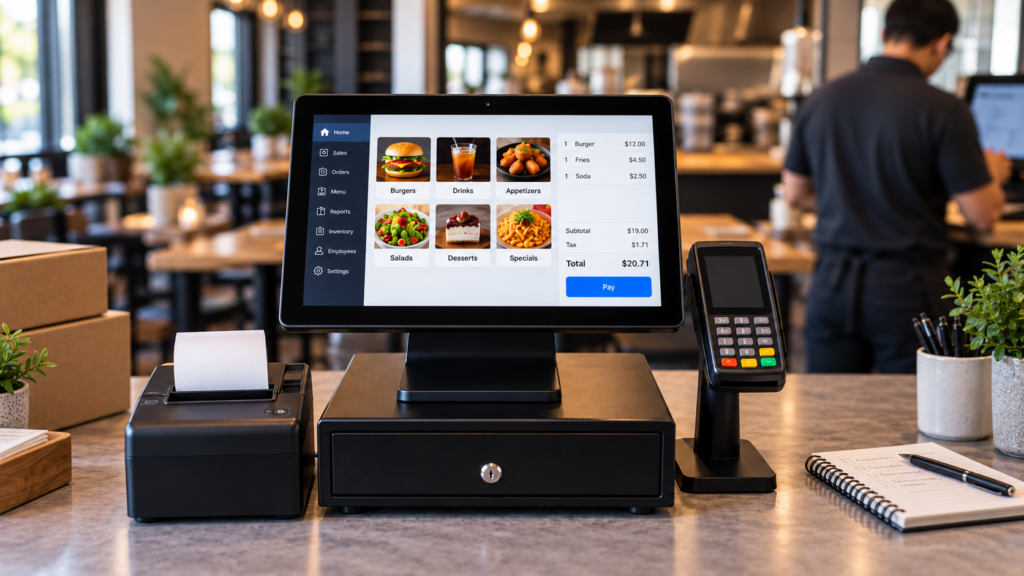
Modern POS system with payment terminal, receipt printer, and setup materials ready for installation and staff training inside a restaurant.

Get Your POS System Set Up the Right Way From Day One

A new POS system should make your business easier to run, not create more confusion.

West Coast POS helps local businesses with POS installation, setup, training, payment terminal setup, printer setup, menu programming, reporting, employee permissions, and ongoing support.

We work with restaurants, retail stores, food trucks, cafes, bars, pizzerias, donut shops, liquor stores, salons, auto shops, and service businesses that need a system installed correctly and a team trained properly.

The goal is simple.

  • Help your staff feel confident.
  • Help your system work the way your business works.
  • Help your business avoid unnecessary downtime, mistakes, and frustration.

Why POS Installation Matters

A POS system is not just a screen and a card reader.

It connects your sales, payments, employees, reports, cash drawers, printers, inventory, menu items, customer data, and daily operations.

If the system is not installed properly, your business may deal with:

  • Slow checkout
  • Staff confusion
  • Printer issues
  • Payment terminal problems
  • Incorrect menu items
  • Wrong tax settings
  • Poor reporting
  • Inventory errors
  • Cash drawer issues
  • Online ordering problems
  • Disconnected hardware
  • Unclear employee permissions
  • Longer training time
  • More support calls after launch

West Coast POS helps prevent these issues by reviewing your business setup before installation and making sure the system is built around your operation.

POS Setup Built Around Your Business

Every business runs differently.

A pizzeria needs toppings, modifiers, delivery options, and kitchen tickets.
A cafe needs fast checkout, drink modifiers, tips, and loyalty.
A retail store needs barcode scanning, inventory, returns, and product categories.
A salon needs service menus, employee tracking, tips, gift cards, and customer history.
A liquor store needs fast scanning, age restricted product workflows, inventory visibility, and cash controls.

West Coast POS helps configure your POS system based on how your business actually operates.

We can help set up:

  • Menu items
  • Product categories
  • Modifiers
  • Taxes
  • Discounts
  • Employees
  • Permissions
  • Cash drawers
  • Receipt printers
  • Kitchen printers
  • Kitchen display systems
  • Payment terminals
  • Barcode scanners
  • Customer profiles
  • Gift cards
  • Loyalty options
  • Inventory tools
  • Sales reports
  • End of day reports
  • Manager access
  • Online ordering integrations

The right setup helps your team move faster and helps owners get better visibility.

On Site POS Installation

West Coast POS provides on site POS installation support for local businesses in Ontario, the Inland Empire, and surrounding Southern California areas.

During installation, our team may help with:

  • POS terminal placement
  • Payment terminal setup
  • Receipt printer setup
  • Kitchen printer setup
  • Cash drawer connection
  • Network and internet review
  • Device connection testing
  • Menu or product setup review
  • Hardware testing
  • Payment testing
  • Printer testing
  • Employee login setup
  • Basic reporting setup
  • Go live preparation

Before the system goes live, we help confirm that the important pieces are working properly.

That includes payments, printers, cash drawers, employee access, and basic reporting.

POS Training for Staff and Managers

Even the best POS system can fail if the team does not know how to use it.

West Coast POS helps train staff and managers so they understand the system before they depend on it during busy business hours.

Training may include:

  • How to start a sale
  • How to accept payments
  • How to split payments
  • How to apply tips
  • How to use discounts
  • How to process refunds
  • How to void items
  • How to open and close checks
  • How to send orders to the kitchen
  • How to use modifiers
  • How to clock in and out
  • How to close a shift
  • How to run reports
  • How managers approve sensitive actions
  • How owners review sales and activity

The goal is to make the system easier for your team to use and easier for managers to control.

Manager and Owner Training

Owners and managers need more than basic checkout training.

They need to know how to use the POS system to run the business.

West Coast POS can help owners and managers understand:

  • Daily sales reports
  • Employee activity
  • Refunds and voids
  • Discount usage
  • Cash drawer activity
  • Inventory movement
  • Payment reports
  • Tip reports
  • End of day closeout
  • Menu performance
  • Product performance
  • Customer activity
  • Loss prevention reports
  • Merchant statement review basics

This helps owners stop guessing and start using the POS system as a business management tool.

Restaurant POS Installation and Training

Restaurants need POS systems that can keep up with fast moving service.

West Coast POS helps restaurants set up and train teams on:

  • Menus
  • Modifiers
  • Combos
  • Courses
  • Tables
  • Tabs
  • Tips
  • Kitchen printers
  • Kitchen display systems
  • Online ordering
  • Delivery and takeout workflows
  • Server reports
  • Manager approvals
  • End of day reports

A properly installed restaurant POS system can help reduce mistakes, speed up service, and give owners better reporting.

Retail POS Installation and Training

Retail stores need clean product setup, fast checkout, and inventory visibility.

West Coast POS helps retail businesses set up and train teams on:

  • Product categories
  • Barcode scanning
  • Inventory tools
  • Returns
  • Refunds
  • Discounts
  • Customer profiles
  • Employee permissions
  • Gift cards
  • Loyalty
  • Payment terminals
  • Daily sales reports
  • Cash drawer reporting

The right retail POS setup can help owners track sales, monitor inventory, and keep checkout moving smoothly.

POS Installation for Service Businesses

Service businesses often need payment processing, employee tracking, customer history, tips, gift cards, appointment related sales, and simple reporting.

West Coast POS helps service businesses set up POS systems for:

  • Salons
  • Nail salons
  • Auto repair shops
  • Medical offices
  • Professional services
  • Mobile services
  • Local service businesses

We help configure the system so it fits the way your team sells services, accepts payments, and tracks customer activity.

Payment Terminal and Hardware Setup

Your POS system depends on more than software.

West Coast POS can help with hardware setup, including:

  • Touchscreen POS terminals
  • Payment terminals
  • Card readers
  • Receipt printers
  • Kitchen printers
  • Cash drawers
  • Barcode scanners
  • Tablet based POS systems
  • Network connected devices
  • Customer facing displays
  • Kitchen display systems

We help test equipment so your business is ready to accept payments and process transactions properly.

Avoid Downtime During POS Setup

Downtime costs money.

A poor POS setup can slow down sales, frustrate employees, and create problems during your busiest hours.

West Coast POS helps review the setup before launch, preparing staff, testing equipment, and answering questions before the system becomes part of your daily workflow.

The goal is to make the transition as smooth as possible.

Local POS Support After Installation

Installation is only the beginning.

Many national companies send equipment, provide a login, and leave business owners to figure out the rest.

West Coast POS provides local support for businesses that want real help from people who understand their operation.

We can help after installation with:

  • Training questions
  • Menu updates
  • Product changes
  • Printer issues
  • Payment terminal questions
  • Report questions
  • Employee permissions
  • System adjustments
  • Merchant statement review
  • Loss prevention support
  • Ongoing service needs

Your business should not feel abandoned after the sale.

Why Choose West Coast POS?

West Coast POS helps local businesses with more than just POS equipment.

We help with the setup, training, support, payment processing, reporting, merchant statement reviews, and loss prevention tools that make the system useful.

Businesses choose West Coast POS because they want:

  1. Local support
  2. On site help
  3. Real people to call
  4. Practical training
  5. POS systems configured around their business
  6. Payment processing support
  7. Reporting guidance
  8. Long term service
  9. A partner who understands local businesses

We serve Ontario, Rancho Cucamonga, Fontana, Riverside, San Bernardino, Chino, Upland, Pomona, the Inland Empire, and businesses throughout Southern California.

A POS system should help your business run smoother, not make your day harder.

West Coast POS can help review your current setup, recommend the right installation approach, train your team, and make sure your system is ready for daily use.

Frequently Asked Questions

POS installation is the process of setting up a point of sale system, connecting hardware, configuring software, testing payments, setting up printers, creating employee access, and preparing the system for daily business use.

Yes. West Coast POS provides on site POS installation support for local businesses in Ontario, the Inland Empire, and surrounding Southern California areas.

POS training may include staff training, manager training, payment processing, refunds, voids, discounts, tips, reporting, cash drawer use, employee permissions, menu updates, product setup, and end of day closeout.

Restaurants, retail stores, food trucks, cafes, bars, pizzerias, donut shops, liquor stores, salons, auto shops, medical offices, and service businesses can benefit from POS installation and training.

Yes. West Coast POS can help train employees, managers, and owners on how to use the POS system, accept payments, run reports, process refunds, manage permissions, and handle daily operations.

Yes. West Coast POS can help set up POS terminals, payment terminals, receipt printers, kitchen printers, cash drawers, barcode scanners, customer displays, and other POS hardware.

Yes. Even simple systems work better when employees understand the correct process. Training helps reduce mistakes, support calls, checkout delays, refund errors, and reporting confusion.

Yes. West Coast POS can help restaurants set up menus, modifiers, tips, tables, kitchen printers, kitchen display systems, online ordering, employee permissions, and reporting.


Yes. West Coast POS can help retail stores set up products, categories, barcode scanners, inventory tools, returns, discounts, customer profiles, employee permissions, and sales reports.

West Coast POS offers POS installation and training in Ontario, the Inland Empire, and throughout Southern California. We typically train on site for the most effective results.

Scroll to Top