
DIY vs Professional POS Installation: Which Is Better?
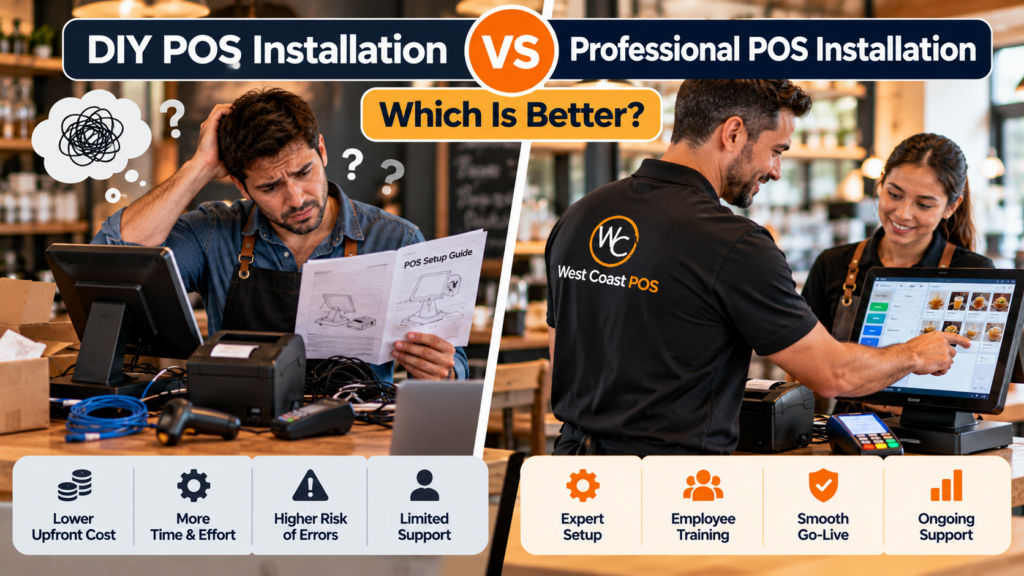
You’ve chosen a point of sale (POS) system for your business. The equipment is ordered, your opening date is approaching, and now you have another decision to make: should you install everything yourself or hire someone to handle the setup?
For some small businesses, connecting a tablet, card reader, and receipt printer is relatively straightforward. For others, installation means configuring multiple registers, connecting kitchen equipment, setting up inventory, activating payments, and training employees before customers arrive.
The right choice depends on the complexity of your business and how much time you can dedicate to installation.
DIY POS installation is generally better for simple, single-register setups with compatible hardware and basic software requirements. Professional POS installation is worth considering when your business needs multiple terminals, connected devices, complex software configuration, employee training, or assistance switching from an existing system.
Neither approach is automatically better. The goal is to get your checkout system operating reliably without spending more time or money than necessary.
This guide compares DIY setup with professional POS installation services, including costs, technical requirements, potential downtime, and the situations where hiring a local provider makes sense.
DIY vs Professional POS Installation: Quick Comparison
The biggest differences between self-installation and professional installation are the amount of work the owner handles, the complexity each approach can accommodate, and the support available during setup.
| Factor | DIY POS installation | Professional POS installation |
|---|---|---|
| Upfront labor cost | Usually no separate installer fee | May include setup and installation charges |
| Hardware setup | Owner connects equipment | Installer helps connect supported devices |
| Software configuration | Owner enters and reviews settings | Provider assists with agreed configuration |
| Network requirements | Best for straightforward connections | Helpful for multiple networked devices |
| Employee training | Owner or manager trains staff | Training may be included or available separately |
| Troubleshooting | Owner follows vendor documentation | Installer can assist within the service scope |
| Installation scheduling | Flexible, based on owner’s availability | Coordinated with provider availability |
| Complex integrations | May require specialized assistance | Provider can help evaluate supported integrations |
| Best suited for | Simple checkout operations | Larger or more complicated POS environments |
Professional installation does not eliminate every potential issue, and DIY installation does not necessarily mean lower overall costs.
A business owner should consider equipment compatibility, preparation time, the cost of mistakes, and the support needed after launch.
What Is DIY POS Installation?
DIY POS installation means the business owner or an employee handles most or all of the setup using instructions supplied by the POS provider.
This typically involves creating an account, installing software, connecting compatible equipment, adding products or menu items, configuring settings, and testing transactions.
Some POS platforms are designed with self-installation in mind.
A small business might use a tablet, compatible payment reader, and receipt printer without needing extensive technical assistance.
When DIY POS Installation Makes Sense
Self-installation may be a practical choice if your business:
Uses one POS terminal or tablet.
Has a small product catalog or simple menu.
Requires minimal additional hardware.
Has reliable internet and accessible power connections.
Uses equipment verified as compatible with the POS platform.
Has staff comfortable following technical setup instructions.
Can dedicate time to testing and troubleshooting before opening.
For example, a small clothing boutique opening with one checkout station might need to connect a register, receipt printer, barcode scanner, and payment device.
If the software supports that equipment and the owner is comfortable with setup, professional installation may not be necessary.
What You Still Need to Handle Yourself
Self-installation doesn’t mean skipping important configuration steps.
The business still needs to establish product prices, applicable taxes, payment processing, employee permissions, receipt settings, and reporting preferences.
You’ll also need to verify the system before accepting live transactions.
If the business runs into an equipment or software issue, the owner may need to contact the vendor’s support team and resolve it independently.
For a new business with a simple operation, that responsibility may be manageable.
For an existing business processing transactions all day, the time required to troubleshoot problems may be more disruptive.
What Is Professional POS Installation?
Professional POS installation involves hiring a provider to assist with preparing, connecting, configuring, and testing a point of sale system.
The exact services depend on the provider, equipment, and installation agreement.
Some providers focus primarily on hardware installation, while others offer broader assistance with software configuration, payment terminals, employee training, and support.
What Do Professional POS Installation Services Include?
Depending on the project, a professional installation may cover:
Hardware setup: Positioning terminals and connecting compatible receipt printers, cash drawers, barcode scanners, payment devices, and customer displays.
Software configuration: Assisting with product catalogs, menus, modifiers, taxes, discounts, employee accounts, and permissions.
Network review: Checking whether terminals, printers, and other supported devices can communicate through the business’s existing network.
Payment setup: Assisting with compatible payment terminal configuration and verifying that the merchant account is ready for approved transaction testing.
Workflow testing: Checking receipts, refunds, printer routing, cash drawers, reporting, and other important checkout functions.
Staff training: Teaching employees and managers how to use the system for their daily responsibilities.
Go-live preparation: Helping the business review readiness before switching to the new system.
Not every provider includes all these services in a standard installation package.
Before hiring anyone, request an itemized description of the work and confirm what support is available after installation.
Is DIY POS Installation Really Cheaper?
DIY installation can reduce or eliminate the amount paid for professional installation labor.
However, the actual cost comparison is more complicated than simply looking at the installation fee.
Consider two different expenses:
Direct costs: Hardware, software subscriptions, professional installation, payment processing, training, accessories, and potential network upgrades.
Indirect costs: Time spent configuring equipment, troubleshooting errors, preparing products, training employees, and correcting problems after launch.
A business owner installing their own system may save on professional labor but spend several hours working through the setup.
Whether that tradeoff is worthwhile depends on the complexity of the project.
Example: Comparing DIY and Professional Setup
Imagine a small retail business preparing a new checkout station.
The hardware and software are identical in both scenarios.
| Expense | DIY example | Professional example |
|---|---|---|
| POS hardware and accessories | $1,200 | $1,200 |
| Installation labor | $0 | $500 |
| Owner setup and testing time | 8 hours | 2 hours |
| Staff training | Owner-led | Included in this hypothetical quote |
| Total direct upfront cost | $1,200 | $1,700 |
This is a hypothetical comparison, not a published market average or West Coast POS quote. Software subscriptions, taxes, payment processing charges, and additional expenses are excluded.
In this example, professional installation costs $500 more upfront but reduces the owner’s involvement in setup.
That may be worthwhile if the owner needs those hours for other opening preparations.
On the other hand, if the business has a simple system and the owner enjoys handling technical projects, DIY installation could be the better financial choice.
The important question is what the additional installation service actually provides.
For a more detailed look at typical setup expenses, read our POS installation cost guide.
When Should You Hire a Professional POS Installer?
There are several situations where professional assistance may be particularly valuable.
1. Your Business Needs Multiple Registers
A single checkout terminal is relatively simple to manage.
Adding several registers introduces more devices, connections, employee accounts, and configuration requirements.
If every register needs to communicate with shared printers, payment devices, or inventory information, the setup requires additional coordination.
A professional installer can help review equipment placement and verify supported connections.
2. You’re Installing a Restaurant POS System
Restaurants frequently need more complicated workflows than basic retail checkout.
A full-service restaurant may use:
Multiple POS terminals
Kitchen display systems
Kitchen printers
Handheld ordering devices
Table management
Menu modifiers
Tipping and check splitting
Online ordering integrations
These devices and functions need to operate together.
For example, a food order entered at the register may need to reach the kitchen while a beverage order goes to the bar.
An incorrect configuration can create problems during service.
Professional restaurant POS installation can be helpful when the business needs assistance connecting and testing these workflows.
3. You’re Switching From an Existing POS System
Replacing a POS system introduces challenges that a brand-new business may not face.
The owner may need to transfer product information, menus, inventory records, or other supported data from the old platform.
Staff also need to learn a different checkout process.
Depending on compatibility, some existing hardware may need to be replaced.
Professional POS installation services can help businesses plan the changeover, test the new configuration, and prepare employees before retiring the old system.
The goal is to reduce unnecessary interruptions, not promise that every migration can happen without downtime.
4. You Need Network or Hardware Assistance
Some equipment connects directly to the main register.
Other devices may depend on Ethernet, WiFi, Bluetooth, or specific adapters.
Connection requirements vary by system.
Even a receipt printer may require supported hardware, network access, and correctly assigned settings before it functions as expected.
A business with several connected devices may benefit from a professional review of its network and hardware configuration.
Specialized wiring, electrical work, and advanced network services may require separate qualified contractors.
5. Your Employees Need Hands-On Training
A POS system can be installed correctly and still create problems if employees don’t understand how to use it.
Cashiers need to practice transactions, corrections, and payment procedures.
Restaurant staff may need to learn menu modifiers, kitchen routing, check splitting, and tips.
Managers need additional instruction on refunds, permissions, reporting, and daily closeout.
If the business has a large team or multiple employee roles, professional training can help organize the learning process.
Learn more in our POS employee training guide.
6. You Can’t Afford a Disorganized Launch
Opening a new business or replacing a system during active operations requires careful scheduling.
A delayed payment activation, printer issue, or incomplete product catalog can interrupt checkout.
A professional installer can help identify preparation requirements and coordinate testing before launch.
However, businesses should still allow time for third-party approvals, hardware delivery, and unexpected technical issues.
Hiring an installer is not a guarantee that the project will be completed without delays.
When Is DIY POS Installation the Better Choice?
Professional installation isn’t necessary for every business.
Consider a small pop-up store operating during weekend markets.
The owner accepts card payments using a supported mobile reader, maintains a simple product catalog, and doesn’t require kitchen printers or multiple checkout stations.
If the owner can follow the provider’s instructions and complete the necessary testing, paying for a full on-site installation may offer limited additional value.
DIY installation is often reasonable when the system is straightforward, the owner has time to prepare, and vendor documentation provides adequate guidance.
The key is to recognize when the installation becomes more complicated than originally expected.
Is a Hybrid POS Installation Approach Possible?
Yes. Some businesses can handle parts of the setup themselves while hiring a professional for more complicated tasks.
For example, a store owner may prepare the product catalog and business information independently.
A POS provider may then help connect supported equipment, configure payment devices, test the setup, and train employees.
This approach can help control costs without leaving the owner responsible for every technical detail.
What Business Owners Can Prepare Themselves
Product names, prices, and categories
Restaurant menus and modifiers
Employee information
Business details
Receipt preferences
Hardware inventory
A list of required reports and integrations
What a Professional May Help With
Confirming hardware compatibility
Connecting multiple terminals and accessories
Reviewing network requirements
Configuring supported devices
Testing payment and printer workflows
Preparing a system migration
Training employees and managers
Ask the provider whether partial installation assistance is available and how it is priced.
Not every company offers a hybrid package.
DIY vs Professional POS Installation for Restaurants and Retail Stores
Business type can make a significant difference in the best installation approach.
Small Retail Stores
Retailers with one register, straightforward inventory, and limited equipment may be comfortable with self-installation.
Professional assistance becomes more valuable as product catalogs, registers, inventory requirements, and connected systems grow.
Restaurants and Cafés
A small coffee kiosk with a basic checkout system may be relatively easy to configure.
A full-service restaurant with kitchen displays, table service, handheld ordering, and extensive menu modifiers is more likely to benefit from professional installation.
Liquor and Convenience Stores
These businesses may need barcode scanning, large product catalogs, inventory tracking, and supported age-restricted sales workflows.
The amount of setup assistance required depends on the equipment and software features.
Salons and Service Businesses
A service business using a tablet to accept payments may need minimal installation.
More complex operations may require employee tracking, appointments, gift cards, customer records, tipping, and integrations with other software.
The decision should reflect how the business processes transactions rather than simply the industry name.
How to Choose a Professional POS Installation Service
If you’ve decided to hire a provider, compare more than the advertised installation fee.
A good starting point is asking exactly what the company will handle.
Questions to Ask Before Hiring
1. Do you install the POS system I’m considering?
Not every installer supports every software platform, payment terminal, or hardware manufacturer.
2. Will you help configure products, menus, and employee permissions?
Some providers only connect physical equipment.
3. Is payment terminal setup included?
Payment approval and activation may involve separate providers or timelines.
4. Will you test the complete checkout process?
Testing should cover supported payments, receipt printing, cash drawers, order routing, and reporting as relevant.
5. Does installation include employee training?
Confirm whether the installer trains cashiers, managers, or both.
6. Are there additional travel, equipment, or service fees?
Ask for a clear quote that identifies included and excluded work.
7. What support is available after installation?
Find out who handles technical questions, software problems, and equipment issues.
8. Can you help us plan around business hours?
This is especially important for restaurants and retailers switching from an existing system.
A provider should be able to explain the proposed scope of work and identify any services handled by third parties.
What Happens During Professional POS Installation?
A typical professional installation project follows a sequence of preparation, configuration, testing, and training.
Initial Consultation
The provider reviews the business type, equipment, checkout stations, software requirements, and existing infrastructure.
Installation Planning
The business and installer confirm hardware requirements, account readiness, setup responsibilities, and the proposed installation schedule.
Equipment and Software Setup
Supported devices are connected and relevant software settings are configured according to the agreed scope.
Payment and Workflow Testing
The installer and business verify that important functions operate correctly, including transactions, printers, orders, inventory, and reports where applicable.
Employee Training
Cashiers and managers practice the tasks they will perform during normal operations.
Go-Live Review
The business confirms readiness before accepting customers or switching away from its previous system.
For a more detailed preparation guide, see our POS installation checklist.
Can Professional POS Installation Reduce Downtime?
Professional installation can help identify problems before launch and improve coordination between equipment, software, payments, and staff.
That may reduce avoidable disruption.
However, no installation method guarantees zero downtime.
A delayed merchant account approval, incompatible accessory, network problem, or incomplete data migration can affect a project regardless of who performs the installation.
For businesses switching systems, it is often useful to prepare software and data before the final equipment changeover.
Installation and testing can sometimes be scheduled outside peak business hours.
Businesses should also maintain a clear support plan and understand whether their old system can remain available during the transition.
Read our POS installation timeline guide for more information about preparing for a new system without unnecessary interruption.
DIY or Professional POS Installation: Which Should You Choose?
The right answer depends on your business’s setup requirements and available resources.
Use this decision guide:
| Your situation | Installation approach to consider |
|---|---|
| One tablet and a basic card reader | DIY |
| One register with a small catalog | DIY or assisted setup |
| Multiple checkout terminals | Professional |
| Full-service restaurant with kitchen devices | Professional |
| Large retail inventory and several scanners | Professional or assisted setup |
| Existing POS system being replaced | Professional or assisted migration |
| Simple mobile service business | DIY |
| New staff requiring extensive training | Professional training assistance |
| Owner comfortable with hardware but not networking | Hybrid setup |
These are general recommendations. The actual choice should depend on the platform, hardware compatibility, support arrangements, budget, and operating requirements.
If your setup is straightforward, installing it yourself may be the most practical option.
If several parts of the business depend on connected technology, professional installation can offer useful assistance.
Professional POS Installation Services in Southern California
Business owners in Ontario, Rancho Cucamonga, Fontana, Riverside, San Bernardino, and surrounding Southern California communities have another option besides handling every installation detail independently.
West Coast POS works with restaurants, retail stores, hospitality businesses, and other local merchants that need help reviewing POS equipment, installation requirements, payment systems, employee training, and support.
Depending on the business and selected POS platform, our team can help with hardware setup, supported software configuration, payment terminal connections, checkout testing, employee permissions, and training.
A small retailer may need assistance getting its first register ready.
A restaurant may need a more involved installation with connected printers, menu programming, and employee onboarding.
The objective is to build a setup that works for the business rather than forcing every customer into the same installation package.
Explore our professional POS installation and training services to learn more about available options.
Get Help With Your POS Installation
Installing a POS system yourself can make sense when the setup is simple and you have time to manage the process.
Professional POS installation may be the better investment when your business relies on multiple devices, advanced configuration, staff training, or a carefully planned system changeover.
If you’re unsure which approach fits your business, start by reviewing the equipment and workflows you actually need.
West Coast POS can help you evaluate the installation requirements, discuss available support options, and determine whether professional assistance makes sense.
Frequently Asked Questions
DIY installation is often suitable for simple systems with one register and limited equipment. Professional POS installation is more appropriate when a business needs multiple terminals, connected hardware, advanced configuration, employee training, or assistance with an existing system migration.
Yes. Many POS platforms provide self-installation instructions for supported equipment. Business owners should verify hardware compatibility, configure software and payments, test transactions, and train employees before going live.
Costs vary depending on the number of terminals, hardware requirements, software configuration, network work, training, and provider. Request an itemized installation quote and review the total setup expenses before making a decision.
Services may include hardware installation, software configuration, network review, payment terminal setup, transaction testing, employee permissions, training, and go-live preparation. The exact scope depends on the provider and agreement.
Some providers include training, while others offer it as a separate service. Confirm whether the installation package covers employee and manager instruction.
Professional installation can help businesses prepare equipment, test workflows, and organize transitions, potentially reducing avoidable interruptions. It cannot guarantee that technical problems or downtime will never occur.
Not always. A simple café or quick-service setup may be suitable for self-installation. Full-service restaurants with multiple registers, kitchen displays, handheld devices, and complex menu workflows may benefit from professional assistance.
Possibly. Compatibility depends on the POS software, hardware model, supported connection methods, and payment provider. Verify compatibility before planning to reuse equipment.
Yes. West Coast POS provides POS installation and training support for businesses in Ontario, the Inland Empire, and surrounding Southern California communities. Contact the team to discuss the equipment, software platform, and installation assistance available for your business.